# Dependency graph
For accuracy and performance, HyperFormula needs to process cells in a correct and optimal order. For example: in formula `C1=A1+B1`, cells `A1` and `B1` need to be evaluated before `C1`.
To find the right order of processing cells, HyperFormula builds a [dependency graph](https://en.wikipedia.org/wiki/Dependency_graph) which captures relationships between cells.
## Cells in the dependency graph
In the dependency graph, each spreadsheet cell is represented by a separate node.
Nodes `X` and `Y` are connected by a directed edge if and only if the formula in cell `X` includes the address of cell `Y`.
## Ranges in the dependency graph
If formulas in the spreadsheet include ranges, each range is represented by a separate node.
The dependency graph may also contain ranges that are not used by any formula, for better optimization.
Range nodes can be connected to cell nodes and to other range nodes.
### Optimizations for large ranges
In many applications, you may want to use formulas that depend on a
large range of cells. For example, the formula `SUM(A1:A100)+B5`
depends on 101 cells, and it needs to be represented in the dependency graph accordingly.
An interesting optimization challenge arises when there are multiple
cells that depend on large ranges. For example, consider the following
use-case:
* `B1=SUM(A1:A1)`
* `B2=SUM(A1:A2)`
* `B3=SUM(A1:A3)`
* ...
* `B100=SUM(A1:A100)`
The problem is that there are `1+2+3+...+100 = 5050` dependencies
for such a simple situation. In general, for `n` such rows, the
engine would need to add `n*(n+1)/2 ≈ n²` arcs in the graph. This
value grows much faster than the size of data, meaning the engine
would not be able to handle large data sets efficiently.
A solution to this problem comes from the observation that there is
a way to rewrite the above formulas to equivalent ones, which will
be more compact to represent. Specifically, the following formulas
would compute the same values as the ones provided previously:
* `B1=A1`
* `B2=B1+A2`
* `B3=B2+A3`
* ...
* `B100=B99+A100`
Whereas this example is too specialized to provide a useful rule
for optimization, it shows the main idea behind efficient handling
of multiple ranges: **to represent a range as a composition of
smaller ranges.**
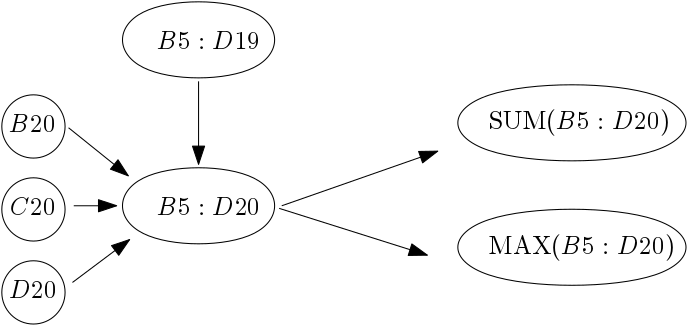
In the adopted implementation, every time the engine encounters a
range, say `B5:D20`, it checks if it has already considered the
range which is one row shorter. In this example, it would be `B5:D19`.
If so, then it represents `B5:D20` as the composition of a range
`B5:D19` and three cells in the last row: `B20`,`C20` and `D20`.

More generally, the result of any associative operation is obtained
as the result of operations for these small rows. There are many
examples of such associative functions: `SUM`, `MAX`, `COUNT`, etc.
As one range can be used in different formulas, we can reuse its
node and avoid duplicating the work during computation.
## Getting the immediate precedents of a cell or a range
To get the immediate precedents of a cell or a range (the in-neighbors of the cell node or the range node), use the [`getCellPrecedents()`](../api/classes/hyperformula.html#getcellprecedents) method:
```js
const hfInstance = HyperFormula.buildFromArray([[ '1', '2', '=A1', '=B1+C1' ]]);
hfInstance.getCellPrecedents({ sheet: 0, col: 3, row: 0 });
// returns [{ sheet: 0, col: 1, row: 0 }, { sheet: 0, col: 2, row: 0 }]
```
## Getting the immediate dependents of a cell or a range
To get the immediate dependents of a cell or a range (the out-neighbors of the cell node or the range node), use the [`getCellDependents()`](../api/classes/hyperformula.html#getcelldependents) method:
```js
const hfInstance = HyperFormula.buildFromArray([[ '1', '=A1', '=A1+B1', '=B1+C1' ]])
hfInstance.getCellDependents({ sheet: 0, col: 0, row: 0 })
// returns [{ sheet: 0, col: 1, row: 0 }, { sheet: 0, col: 2, row: 0 }]
```
## Getting all precedents of a cell or a range
To get all precedents of a cell or a range (all precedent nodes reachable from the cell node or the range node), use the [`getCellPrecedents()`](../api/classes/hyperformula.html#getcellprecedents) method to implement a [Breadth-first search (BFS)](https://en.wikipedia.org/wiki/Breadth-first_search) algorithm:
## Getting all dependents of a cell or a range
To get all dependents of a cell or a range (all dependent nodes reachable from the cell node or the range node), use the [`getCellDependents()`](../api/classes/hyperformula.html#getcelldependents) method to implement a [Breadth-first search (BFS)](https://en.wikipedia.org/wiki/Breadth-first_search) algorithm: